Revision Table for EB-WI-0010 "Start a New Process Library"
| Rev | Description of Change |
| - | Initial release |
| A | Updated for stanhope version 0.11.1 |
| B | Fleshed out CSV authoring section |
| C | Updated resources and verifications throughout the document |
| D | Refined requirements and action tables in all sections |
| E | Collapsed steps in the "Create your CSV file" section |
| F | Installation instructions continue evolution (first section, multiple steps modified and added) |
| G | Adding the (new) "context" blurbs throughout |
| H | Helpful image added to the first step to visually describe the folder structure of a Process Library |
| I | Changed title to describe the real use case better |
| J | Added the new "Objective" type lines throughout |
| K | Added the new "Out of Scope" lines throughout |
| L | Added the "Process Type" line |
| M | Updated a warning text to suggest free software to use for Excel files. Also, caption updated for the "help" dialog screenshot. |
| N | Added Templates "Roles.css" and "NonConformances.css" to demonstrate new functionality in stanhope 0.31.0 |
| O | Added Templates "NoAI.css" and "DistributionA.css" in general alignment with published process documents released to a public website |
| P | Added an embedded CSV table to the first step (stanhope 0.58.0) |
| Q | Added an external CSV file / table reference to the first step (stanhope 0.61.0) |
| R | Cleaned up extra steps, changed Reviewer to Christina, used new default assets (stanhope 0.70.0) |
| S | Added a new first section to skip all the manual steps |
Requirements Table for EB-WI-0010 "Start a New Process Library"
Successful execution of this procedure produces evidence of verification for the requirements listed in the table below. Therefore, this procedure's execution is particularly important for us to achieve our goal. When you see procedure call-outs in this style of box, that step is what produces this critical evidence. Take the time to understand how these requirements will be verified prior to starting this procedure, and consult this procedure's author (Duane Dier) if necessary.
| RID | Text of Requirement | Verif. Method | Step |
| S01 | The operator shall have "execute" permission for the stanhope executable file. | Inspection | Step 2.2 |
| S02 | The stanhope executable file shall exist in the process library folder's root. | Inspection | Step 2.2 |
| S03 | The stanhope.css base template file shall exist in the process library's "assets" folder. | Inspection | Step 2.3 |
| S04 | The input CSV file's first six columns shall be (in order): 'Document Number', 'Title', 'Subject', 'Product', 'Author', and 'Reviewer'. | Inspection | Step 3.1 |
| S05 | Each process listed in the CSV file shall reside in a folder named as the document number. | Inspection | Step 5.1 |
| S06 | For each new process identified in a CSV file, the stanhope application shall produce a markup file and associated HTML file in that process's folder in the process library. | Sampling | Step 5.2 |
EB-WI-0010, Rev S "Start a New Process Library"
- Section 1: Kick-Start a Library With a Tad of Automation
- Step 1.1: Create a folder that will be your Process Library
- Step 1.2: Open a terminal window in your new folder
- Step 1.3: Automatically download everything you need
- Step 1.4: If successful, skip the next section and advance to "Create your CSV file"
- Section 2: Set up your process library
- Step 2.1: Create a new folder to be your Process Library
- Step 2.2: Install the stanhope application in the Process Library folder
- Step 2.3: Install common assets and document list template
- Section 3: Create your CSV file
- Step 3.1: Use Excel template
- Step 3.2: Add or change the colum headers for columns beyond the first required six
- Section 4: Run the stanhope application
- Step 4.1: Run stanhope in the proper mode
- Section 5: Verify the results
Personnel Performing this Process, by Named Role:
| Role in this Process | Name of Person | Initials | Contact Information |
This process has 4 stated objectives:
- Create a Process Library to develop and publish all process documents (Step 2.1)
- Complete the installation of all necessary components for the Easy Button workflow (Step 2.3)
- Demonstrate software functionality in your working environment (Step 4.1)
- Populate the Process Library according to what's in the list (Step 5.1)
This process has 2 Out Of Scope declarations:
- This procedure does not cover how to modify files in the "assets" folder. See EB-WI-0100. (Step 2.3)
- This process does not cover PDF generation. See EB-WI-0020. (Step 5.2)
"Start a New Process Library" applies to CSV File to produce Set of Process Markup Files
 →
→
→
3 named resources are identified to perform this process:
Step 2.2
stanhope 0.6.0 or later for Windows, Mac, or Linux
stanhope 0.6.0 or later for Windows, Mac, or Linux
Step 2.3
EasyButton "Asset Bundle" Free Edition (or better)
EasyButton "Asset Bundle" Free Edition (or better)
Step 2.3
EasyButton "DocumentList" Excel file template
EasyButton "DocumentList" Excel file template
| Time | Step | Record | Brief Summary of Observation(s) that Deviated from Documented Expectations |
Step 1.3: Automatically download everything you need
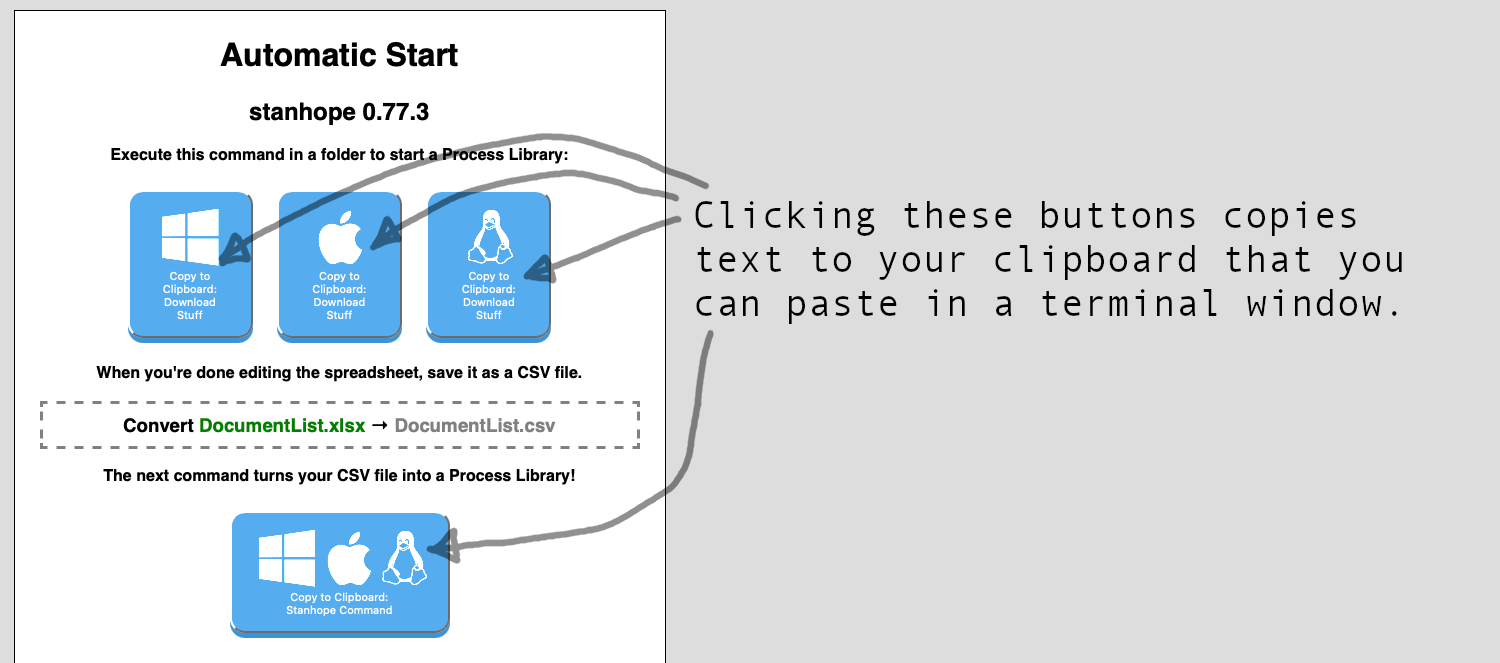
https://stanhope.strativusgroup.com gives you a way to automate the creation of a Process Library
Windows (x86 or ARM64... works on either)
Invoke-WebRequest 'https://stanhope.strativusgroup.com/latest/assets.zip' -OutFile 'assets.zip'; Invoke-WebRequest 'https://stanhope.strativusgroup.com/latest/DocumentList.xlsx' -OutFile 'DocumentList.xlsx'; Invoke-WebRequest 'https://stanhope.strativusgroup.com/latest/windows/stanhope.exe' -OutFile 'stanhope.exe'; Expand-Archive -Path assets.zip -DestinationPath .; Invoke-Item DocumentList.xlsx
MacOS (Apple Silicon)
wget 'https://stanhope.strativusgroup.com/latest/assets.zip'; wget 'https://stanhope.strativusgroup.com/latest/DocumentList.xlsx'; wget 'https://stanhope.strativusgroup.com/latest/macos/stanhope'; chmod +x stanhope; unzip assets.zip; open DocumentList.xlsx;
Linux (x86)
wget 'https://stanhope.strativusgroup.com/latest/assets.zip'; wget 'https://stanhope.strativusgroup.com/latest/DocumentList.xlsx'; wget 'https://stanhope.strativusgroup.com/latest/macos/stanhope'; chmod +x stanhope; unzip assets.zip; xdg-open DocumentList.xlsx;
https://stanhope.strativusgroup.com gives you a way to automate the creation of a Process Library
Step 2.1: Create a new folder to be your Process Library
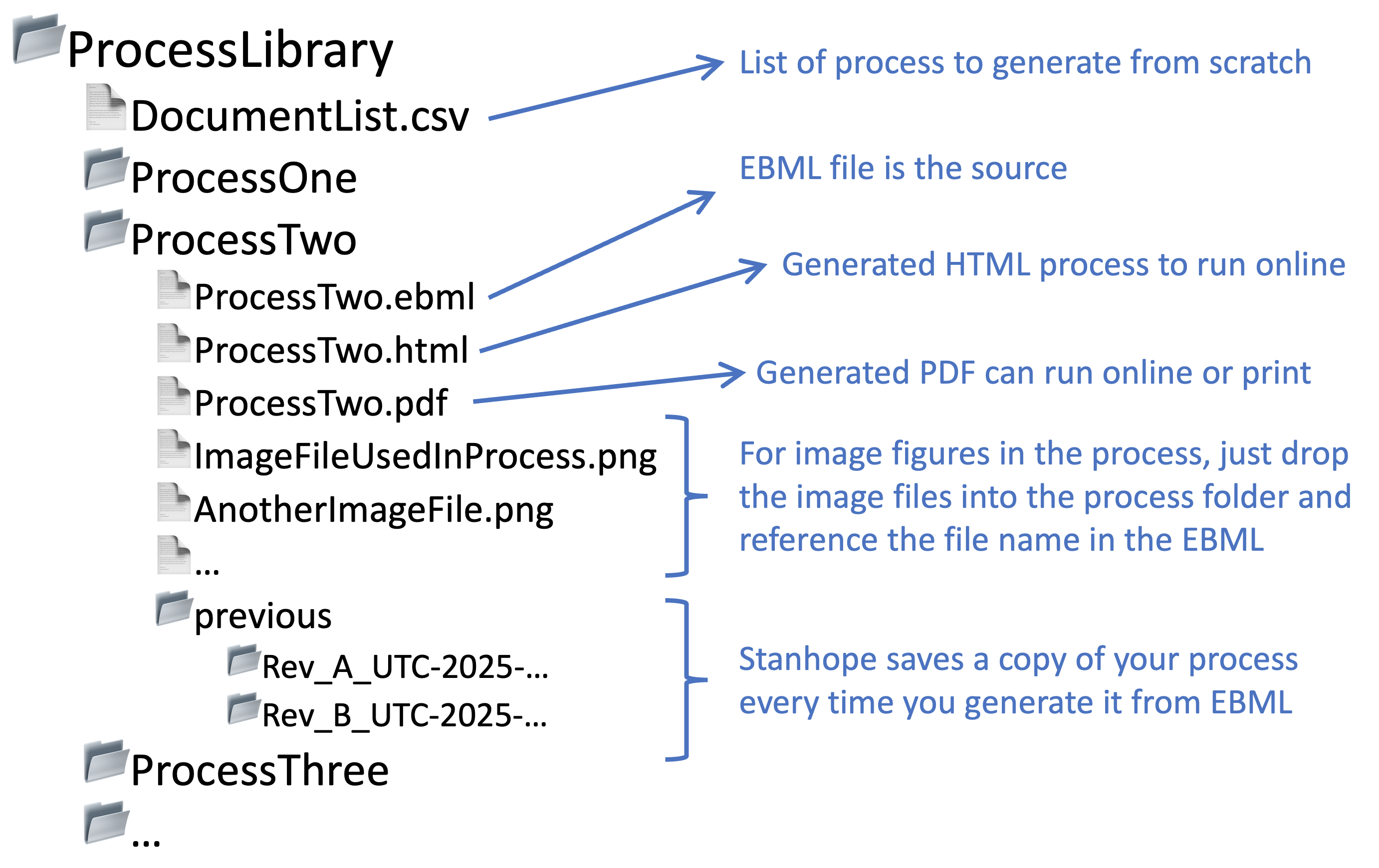
The overall Process Library folder structure contains one subdirectory per process, an "assets" folder for common files, the "stanhope" executable, and for this specific process, the CSV file from which the process folders will be created.
Your Process Library is a folder structure, with one folder per process document.
This procedure is appropriate for starting from scratch, and this section walks you through producing the initial Process Library folder, and the essential files to make process generation work smoothly. The stanhope application creates the subfolders for you based on the contents of your CSV file, which will all be covered by different sections of this process.
The only substantive and unique step in this entire process is the shortest: Step 3.1 - a simple call to the stanhope application is all it takes to convert a well-formatted CSV file into a functional Process Library. These first sections are only truly necessary if this your first Process Library.
The overall Process Library folder structure contains one subdirectory per process, an "assets" folder for common files, the "stanhope" executable, and for this specific process, the CSV file from which the process folders will be created.
If you already have a process library folder identified, skip this step
| Action to perform | Expected | Result | Done | TPV |
| In a terminal application, navigate to where you want your process library folder to reside using the commands below | "pwd" returns the same folder commanded in "cd" command | ▢ | N/A |
cd /company/project/
pwd
| Action to perform | Expected | Result | Done | TPV |
| Create a "process_library" folder with the command below | No error messages | ▢ | N/A |
mkdir process_library
cd process_library
Create a Process Library to develop and publish all process documents
Step 2.2: Install the stanhope application in the Process Library folder

The "x" in the middle "rwx" string shows that stanhope is executable. In the example shown in this figure, an administrator of this system has read, write, and execute permissions, while the current user (and other anonymous users indicated in the right-hand "rwx" triplet) have only read and execute permissions.
1 named resources are identified to perform this step:
stanhope 0.6.0 or later for Windows, Mac, or Linux
| Action to perform | Expected | Result | Done | TPV |
| Transfer stanhope executable to the process library folder, using a system GUI (drag-drop) or commands similar to those below | No errors in transferring | ▢ | N/A |
cp ~/Downloads/stanhope .
| Action to perform | Expected | Result | Done | TPV |
| Confirm that the current user can execute stanhope, using system GUI dialogs or the command below | stanhope is executable ("x" in the middle "rwx" triplet) | ▢ | N/A |
ls -la .
The "x" in the middle "rwx" string shows that stanhope is executable. In the example shown in this figure, an administrator of this system has read, write, and execute permissions, while the current user (and other anonymous users indicated in the right-hand "rwx" triplet) have only read and execute permissions.
This step produces the evidence of verification for this requirement:
S01: "The operator shall have "execute" permission for the stanhope executable file." (Verify by Inspection)
Please ensure the evidence produced passes the requirement before proceding. This might require consulting this procedure's author, Duane Dier.
S01: "The operator shall have "execute" permission for the stanhope executable file." (Verify by Inspection)
Please ensure the evidence produced passes the requirement before proceding. This might require consulting this procedure's author, Duane Dier.
This step produces the evidence of verification for this requirement:
S02: "The stanhope executable file shall exist in the process library folder's root." (Verify by Inspection)
Please ensure the evidence produced passes the requirement before proceding. This might require consulting this procedure's author, Duane Dier.
S02: "The stanhope executable file shall exist in the process library folder's root." (Verify by Inspection)
Please ensure the evidence produced passes the requirement before proceding. This might require consulting this procedure's author, Duane Dier.
Step 2.3: Install common assets and document list template
2 named resources are identified to perform this step:
EasyButton "Asset Bundle" Free Edition (or better)
EasyButton "DocumentList" Excel file template
| Action to perform | Expected | Result | Done | TPV |
| Create a folder named "assets" in the process library folder (see commands below) | No error messages | ▢ | N/A | |
| Transfer all files in the "Asset Bundle" into the new "assets" folder (see commands below) | No error messages | ▢ | N/A |
mkdir assets
gunzip ~/Downloads/AssetBundle.zip assets/
| Action to perform | Expected | Result | Done | TPV |
| List contents of the process library's "assets" folder (use command below) | At least one file (stanhope.css) | ▢ | ▢ |
ls -la ./assets
This step produces the evidence of verification for this requirement:
S03: "The stanhope.css base template file shall exist in the process library's "assets" folder." (Verify by Inspection)
Please ensure the evidence produced passes the requirement before proceding. This might require consulting this procedure's author, Duane Dier.
S03: "The stanhope.css base template file shall exist in the process library's "assets" folder." (Verify by Inspection)
Please ensure the evidence produced passes the requirement before proceding. This might require consulting this procedure's author, Duane Dier.
Complete the installation of all necessary components for the Easy Button workflow
This procedure does not cover how to modify files in the "assets" folder. See EB-WI-0100.
Step 3.1: Use Excel template
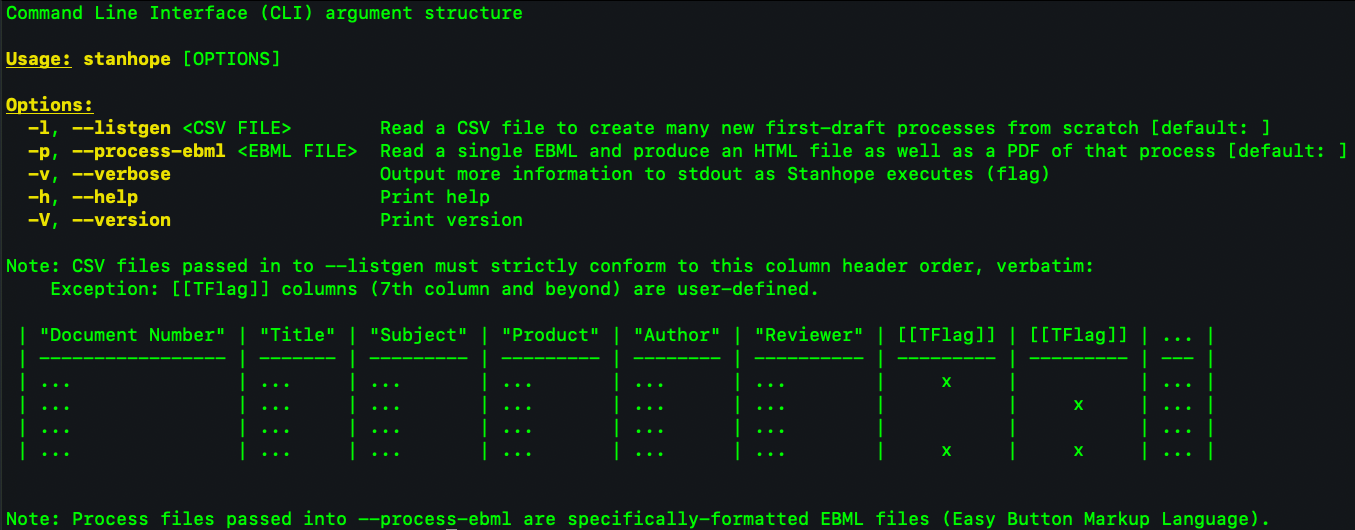
Result of running stanhope 0.11.1 with the --help flag. For later versions of stanhope, the "help" dialog might be longer. You might need to scroll up in your terminal window to see the column definition text shown in this image.
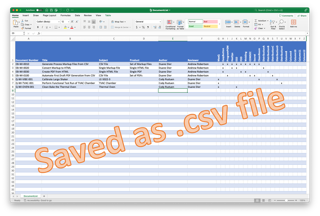
If you don't have an application that can process Excel files, you can create a CSV manually as plain text. LibreOffice works just fine for working with Excel files and saving as CSV.
| Action to perform | Expected | Result | Done | TPV |
| Open "DocumentList.xlsx" | File has at least 6 (six) columns in the first row | ▢ | N/A | |
| Confirm first column header is "Document Number" | First column header is "Document Number" | ▢ | N/A | |
| Confirm first column header is "Title" | First column header is "Title" | ▢ | N/A | |
| Confirm first column header is "Subject" | First column header is "Subject" | ▢ | N/A | |
| Confirm first column header is "Product" | First column header is "Product" | ▢ | N/A | |
| Confirm first column header is "Author" | First column header is "Author" | ▢ | N/A | |
| Confirm first column header is "Reviewer" | First column header is "Reviewer" | ▢ | N/A | |
| Run stanhope with the "help" flag | Displayed CSV format matches the required columns inspected above | ▢ | N/A |
./stanhope --help
Result of running stanhope 0.11.1 with the --help flag. For later versions of stanhope, the "help" dialog might be longer. You might need to scroll up in your terminal window to see the column definition text shown in this image.
This step produces the evidence of verification for this requirement:
S04: "The input CSV file's first six columns shall be (in order): 'Document Number', 'Title', 'Subject', 'Product', 'Author', and 'Reviewer'." (Verify by Inspection)
Please ensure the evidence produced passes the requirement before proceding. This might require consulting this procedure's author, Duane Dier.
S04: "The input CSV file's first six columns shall be (in order): 'Document Number', 'Title', 'Subject', 'Product', 'Author', and 'Reviewer'." (Verify by Inspection)
Please ensure the evidence produced passes the requirement before proceding. This might require consulting this procedure's author, Duane Dier.
Step 3.2: Add or change the colum headers for columns beyond the first required six
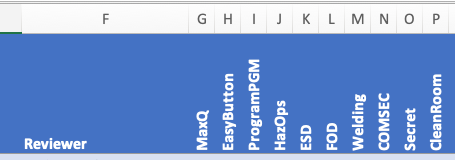
An example set of Template columns, each with their own CSS file in the ../assets/ folder
An example set of Template columns, each with their own CSS file in the ../assets/ folder
| Action to perform | Expected | Result | Done | TPV |
| Customize the column headers for the types of documents that will reside in this process library | Column headers represent the various kinds of process documents for the project | ▢ | N/A | |
| Save the Excel file as a CSV file "DocumentList.csv" | No errors | ▢ | N/A |
Step 5.1: Inspect the process library folder
| Action to perform | Expected | Result | Done | TPV |
| List contents of the process library (use command below) | One new folder for each data row in the CSV file, each named as the Document Number | ▢ | ▢ |
ls -la
This step produces the evidence of verification for this requirement:
S05: "Each process listed in the CSV file shall reside in a folder named as the document number." (Verify by Inspection)
Please ensure the evidence produced passes the requirement before proceding. This might require consulting this procedure's author, Duane Dier.
S05: "Each process listed in the CSV file shall reside in a folder named as the document number." (Verify by Inspection)
Please ensure the evidence produced passes the requirement before proceding. This might require consulting this procedure's author, Duane Dier.
If a line in the CSV file already has an associated process library folder, stanhope will look for an EBML file in that folder. If the EBML file already exists, stanhope will not perform any actions for that process when executing in "listgen" mode.
Populate the Process Library according to what's in the list
Step 5.2: Sample the process folders to confirm properly-created process files
| Action to perform | Expected | Result | Done | TPV |
| List the contents of a newly-created process folder, using a system GUI or a command similar to the one below. | Two files in the folder: [Process Number].ebml and [Process Number].html | ▢ | N/A | |
| List the contents of another newly-created process folder | Two files in the folder: [Process Number].ebml and [Process Number].html | ▢ | N/A |
ls ./[ProcessNumber] # replace [ProcessNumber] with any "Number" from the CSV file
This step produces the evidence of verification for this requirement:
S06: "For each new process identified in a CSV file, the stanhope application shall produce a markup file and associated HTML file in that process's folder in the process library." (Verify by Sampling)
Please ensure the evidence produced passes the requirement before proceding. This might require consulting this procedure's author, Duane Dier.
S06: "For each new process identified in a CSV file, the stanhope application shall produce a markup file and associated HTML file in that process's folder in the process library." (Verify by Sampling)
Please ensure the evidence produced passes the requirement before proceding. This might require consulting this procedure's author, Duane Dier.
This process does not cover PDF generation. See EB-WI-0020.